

Find your Home Assistant address
Try the default address first
Section titled “Try the default address first”From a device on the same network as Home Assistant, open:
http://homeassistant.local:8123- It opens: continue installing or pairing. You do not need the HA IP.
- It does not open: use one of the methods below to find the HA IP.
When the default address does not open
Section titled “When the default address does not open”Option 1: Check inside Home Assistant
Section titled “Option 1: Check inside Home Assistant”If another device can still open Home Assistant, go to Settings → System → Network and read the IPv4 address.
Option 2: Use a command
Section titled “Option 2: Use a command”On Windows, open PowerShell and run:
ping -4 homeassistant.localThe number in square brackets on the first line is the HA IP.
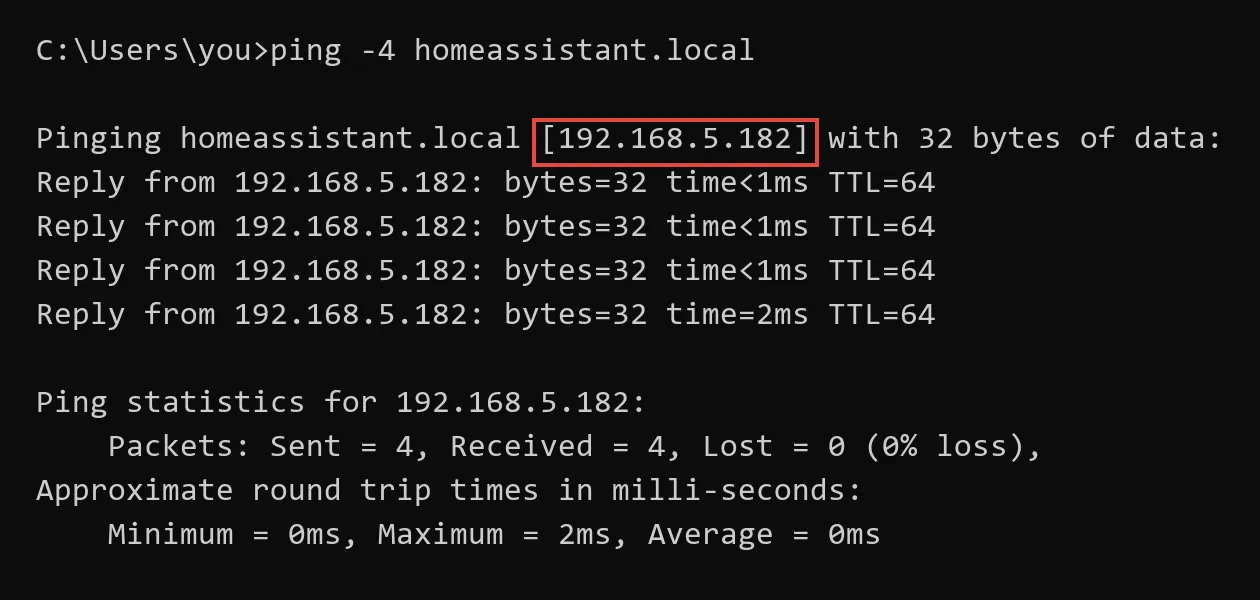
If macOS does not support -4, run ping homeassistant.local instead.
Option 3: Check the router
Section titled “Option 3: Check the router”Open the router’s Connected devices or DHCP clients page. Find homeassistant, HAOS, or Home Assistant, then note its IP.
Continue with the IP
Section titled “Continue with the IP”Insert the IP you found into:
http://<your-HA-IP>:8123